Sunday, May 15, 2016

Google's iOS keyboard is the GIF and emoji app of my dreams


I just deleted the Giphy app from my iPhone. This is notable because I adore GIFs. I find a deep, slightly perverse, pleasure in sending texts full of those little moving pictures to my loved ones, and the Giphy app streamlined my image-hunting process 10-fold. But now, it's gone from my home screen, deleted forever because I found something that makes texting with GIFs even easier. I found Gboard.

Let's not get melodramatic here: Gboard is simply Google's new iOS keyboard. It's not an app that will change your life or make your surly traditionalist uncle see the true value of technology, but it's a welcome addition to my own texting routine. Gboard features Google search right in the keyboard, plus the ability to hunt for emoji by name. There's also the Glide Typing swipeable keyboard and, of course, GIF search.

The embedded Google search function is ridiculously handy. It brings browser searching straight to the keyboard, eliminating the process of closing the texting app, opening a browser, copying a link, closing the browser and finally pasting the information into a message. Instead, tap the G icon in the upper left corner of the keyboard and search right there for anything on the web, including weather reports, addresses, flight information and nearby cat cafes (hey, we said anything). Search results pop up in a single row of clickable cards; tap one, and its headline and URL automatically populate in your message. If you want to add it, just tap the card, tap the message field, hit "paste" and voila!

Once you've searched for something, you're able to toggle among web, image and GIF results via three icons under the row of cards. To add an image or GIF, tap the card you want and it's automatically ready to be pasted, either as a boring static picture or a gloriously mobile, extra-short narrative experience. (Have I mentioned how much I love GIFs?)

But that's not the only way Gboard can add GIFs to texts. A small smiley face to the left of the spacebar brings up the standard iOS selection of emojis, plus the option to toggle to GIF search. Hit the "GIF" icon under those yellow smiley faces and search for whatever moving picture you'd like, or browse suggested searches such as "high-five," "thumbs up," "shrug" and "mic drop."

Source: Engadget

Google's iOS keyboard is the GIF and emoji app of my dreams

I just deleted the Giphy app from my iPhone. This is notable because I adore GIFs. I find a deep, slightly perverse, pleasure in sending texts full of those little moving pictures to my loved ones, and the Giphy app streamlined my image-hunting process 10-fold. But now, it's gone from my home screen, deleted forever because I found something that makes texting with GIFs even easier. I found Gboard.

Gallery: Google's iOS keyboard, Gboard | 16 Photos

Let's not get melodramatic here: Gboard is simply Google's new iOS keyboard. It's not an app that will change your life or make your surly traditionalist uncle see the true value of technology, but it's a welcome addition to my own texting routine. Gboard features Google search right in the keyboard, plus the ability to hunt for emoji by name. There's also the Glide Typing swipeable keyboard and, of course, GIF search.
The embedded Google search function is ridiculously handy. It brings browser searching straight to the keyboard, eliminating the process of closing the texting app, opening a browser, copying a link, closing the browser and finally pasting the information into a message. Instead, tap the G icon in the upper left corner of the keyboard and search right there for anything on the web, including weather reports, addresses, flight information and nearby cat cafes (hey, we said anything). Search results pop up in a single row of clickable cards; tap one, and its headline and URL automatically populate in your message. If you want to add it, just tap the card, tap the message field, hit "paste" and voila!
Once you've searched for something, you're able to toggle among web, image and GIF results via three icons under the row of cards. To add an image or GIF, tap the card you want and it's automatically ready to be pasted, either as a boring static picture or a gloriously mobile, extra-short narrative experience. (Have I mentioned how much I love GIFs?)
But that's not the only way Gboard can add GIFs to texts. A small smiley face to the left of the spacebar brings up the standard iOS selection of emojis, plus the option to toggle to GIF search. Hit the "GIF" icon under those yellow smiley faces and search for whatever moving picture you'd like, or browse suggested searches such as "high-five," "thumbs up," "shrug" and "mic drop."
Even emojis are searchable in Gboard in a pleasantly natural way. Most icons seem to respond to a variety of terms -- for example, searching for "Halloween" brings up a jack-o-lantern. The search even works with some misspellings and inaccurate predicted text. Not using the swipeable keyboard, I searched for "Halloweeb" and still received the happy little pumpkin, while "jack" brought up the pumpkin and the Union Jack. Using the swipeable keyboard, I accidentally searched for "punishing" and received a row of fists -- and a jack-o'-lantern at the very end.
Emoji search is a wonderful addition to my texting life, since I find scrolling through rows of vaguely sorted icons to be time-consuming and frustrating. Plus, Gboard suggests emojis even when you're composing a text-only message. For example, I started asking my boyfriend if he wanted to get a burrito for lunch, and the first suggested "word" under the message was the burrito emoji. We also messaged each other about butts for a while, which is when I realized the peach emoji actually represents a booty, not a vagina. The more you know, indeed.
Overall, the Glide Typing function is suitably responsive (this isn't the first swipeable keyboard for iOS, after all), though I have to make sure the nail on my thumb doesn't interfere with my actual swiping.


Gboard makes a lot of sense. I wouldn't be surprised if it became the standard for keyboards in the near future -- it's a welcome upgrade based on how people actually send text messages. And GIFs. We can't forget the GIFs.

Sunday, October 21, 2012

Samsung Galaxy Tab 2 7.0 Review


I like seven-inch tablets very much. They are compact and comfortable devices that can fit into a small bag or even into a jacket pocket. They are also more lightweight and less expensive than ten-inch models. The one we are reviewing here, the Galaxy Tab 2 7.0, represents a logical sequel and extension of the compact tablet lineup by Samsung.

Design, materials & controls
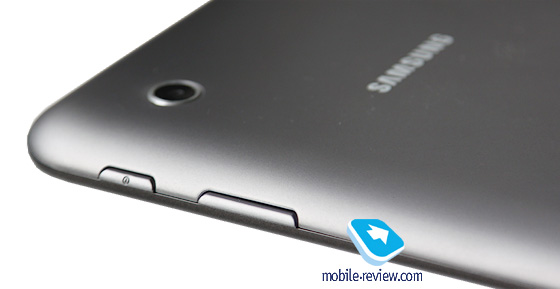
The right side accommodates the volume rocker and the power button. Their travel is short and soft, so the buttons are comfortable to use.

This one resembles many other Samsung tablets, and not only them actually.

On the left, we get slots for a microSD card and a SIM card (in 3G version). Both slots are covered with protecting caps that are perfectly fastened and don't seem to come loose in the future.

On the bottom, we can see the proprietary charging socket also used to connect the device to a PC. On both sides of it, there are speakers, covered with grids, and a microphone. The sound volume produced by the speakers is moderate, but if you hold the tablet horizontally, you may cover them with your hand.
On the top, we have a 3.5-mm audio jack and another microphone.
The entire front panel is occupied by the screen and a black bezel around it; the front camera eyelet and the voice speaker are above the screen.
The tablet also has a rear side camera. The backside itself is made of grey matt plastic that feels nice to the touch and is quite wear-resistant; no scratches appear on it. So we can be glad Samsung decided not to use their favorite glossy plastic for the backside of this tablet.
By the way, the white version of this model also hit the shelves not so long ago.
There are absolutely no complaints about the build quality, unlike the majority of low-end tablets that normally produce lots of creak and crackle, but we get nothing of the kind here.


First Look. Sony LT30p Mint

Introduction
Sony wants to make a strong effort to return to the market as a player both with strong and numerous solutions. Xperia S created a uniqure situation for the company, with only one new device available for more than a month with the rest of the same line up appearing on most markets roughly four weeks ago. This time around Sony is trying to create as many devices as possible with many or just a few differences betweebn them offered at different prices to offer one device for every consumer.
LT30p belongs to this new crop of models and along with Sony Tipo and a couple of other new handsets, which are also to be presented also tries to differentiate itself from the design philosophy that was used in Xperia S and all its junior sibblings. Lt30p aims at the high end maket to be placed as Sony's flahsgip for the third quarter of the year. While practically replacing Xperia S in that place, it has very few similarities both in terms of design and features.

Wednesday, April 18, 2012

Translator App for Windows Phone receives major update – Video Demo


Microsoft’s Windows Phone Bing Translator application has just received a major update.
Within the new update Microsoft has added some great new features like:
Offline Translation – you can download language packs for offline use
Point, Scan and Translate – translate printed language by simply pointing the camera
Type and Translate – instant translations using keyboard input
Speak and Translate – allows users to speak phrases into their phone, the device will then speak back what you just said in the desired language.
You can download Microsoft’s Translator from the Marketplace for free.
Check the video:

Samsung Developing Handset for Windows Phone 8

Samsung is reported to be releasing at least one handset running Windows Phone 8, the upcoming new version of Microsoft’s mobile OS, codenamed Apollo.

According to UnwiredView.com – quoting Chinese website ePrice – Samsung Taiwan has confirmed that an Apollo-based phone will arrive in the second half of 2012. Unwiredview reckons this is not likely before October, as the new version of the WP operating system is not due until around then.
It may be one of three new Windows Phone devices from Samsung. Most of the world is waiting to see what the Korean giant does with the imminent Galaxy S3 handset, and other models in its ever expanding Android range, such as the Galaxy Note.

However, Samsung is clearly trying to keep a broad portfolio of products, while holding off from embracing Windows Phone as much as, say, Nokia with its Lumia range.


Samsung has previous form in this area. Last year it brought out the well-received Omnia 7, running Windows Phone 7 (Mango).

Dream: ON iPhone app to bring you blissful dreams


Wish to enjoy some blissful dreams tonight? A superb iPhone app called the Dream: ON will help you enjoy some perfect reveries. Dream: ON is an effort by professor Richard Wiseman of the University of Hertfordshire, Britain, to see whether pleasant soundscapes could influence one’s dreams. The app just checks users sleep patterns to identify when they slip to REM sleep and play preferred soundscapes to influence dreams, says Wiseman.

Studies have shown that most dreams occur during REM sleep. Your mind will be alert to other senses while you dream and so the soundscapes from your iPhone will naturally boost your dreams. Dream: ON plays the soundscape you have selected before going to bed. The soundtrack will keep your mind ready for dreaming and they will occur as you expected. But the app's developer warns that everyone won't have similar dreams. And so Dream: ON may not be effective for all and it may turn effective for many with few days' practice.
To run the Dream: ON, you are required to choose a particular soundscape from a preloaded list that includes a peaceful garden, ocean and others. It is to predetermine the mood of your dream in the night. After setting all the options, you should place your iPhone face down on the bed. The app will observe your movements during sleep and instigate dreams in you. Soon after, the app will begin to play the specific soundscape, which will lead you to a perfect dream. The app will itself adjust the sound to make sure you are not getting awake. This is what professor Richard Wiseman has to say about the Dream: ON app,\
We have created a new way of carrying out mass participation experiments. We still know relatively little about the science of dreaming and this app may provide a real breakthrough in changing how we dream, and record and track those dreams.
 Apart from helping you have perfect dreams, the app has a fully functional smart alarm, which will let users wake up with a fresh mind. The alarm gently produces voice to wake you up at an optimum moment. Moreover, it has a functionality to record your dreams and sleeping patterns as graphs. In the morning, the app will show a graphical pattern of your sleep movements.
The app also has an option to help you instantly share your dreams and sleeping patterns with friends on social media sites like Twitter and Facebook. The researcher behind Dream: ON is also working to develop a Dream Bank, a social platform where users can share their dreams and read the dreams of their friends. Of course, Dream: ON might be the world's biggest dream experiment ever.

Lava Xolo X900: Intel Medfield-based phone to hit stores next week

Lava International is all set to release the first smartphone with Intel’s newly announced Medfield mobile chips in India. Dubbed the Xolo X900, the phone will run on as-yet-unspecified version of Google Android. The device was originally announced at the Mobile World Congress 2012 by the Lava executives and Intel’s CEO Paul Otellini. Intel has also signed deals with Lenovo, Motorola and Orange besides Lava to produce hardware solutions for its new Atom chips for mobile devices.


The Lava Xolo X900 will tout rich specs under the hood. The device will sport a 4.03-inch touchscreen with decent screen resolution and clarity. Intel’s new Z2460 single core processor with a clock-speed of 1.6GHz will power the gadget. The processor can ensure long battery life (up to 8 hours) with the 3G voice calling. You can enjoy six hours of HD video and five hours of 3G web browsing and 14 hours of standby on single charge.

It seems that Lava would become the first firm in the world to release an Intel Medfield-based device. Lenovo’s WMC 2012-featured K900 smartphone is only to come in May, 2012. Motorola and Orange haven’t yet announced their Intel devices. Thus, Lava Xolo X900 may be the first device with Intel's mobile processor.

The chip maker, which has been dominating the chip market for PCs and servers, wishes to enter into the mobile market with its new range of mobile processors. Mr. Otellini thinks that there is enough space for Intel to get into the mobile industry, which is currently dominated by the Cambridge, U.K-based ARM Holdings. Intel is in efforts to put holes in the supremacy of ARM. The company has already started talks with the leading tech makers like Apple and Samsung to encourage them to use its Medfield chips in their products.

Wednesday, April 11, 2012

Nokia Lumia 610 NFC announced


Today at WIMA in Monaco, Nokia announced their first NFC Windows Phone, Lumia 610 NFC. Nokia’s Andrea Bacioccola explains how people can use NFC on the Lumia 610 NFC.
NFC stands for Near Field Communication and advantages you get with Lumia 610 NFC are being demoed in the video: activating tags by tapping on them and connect to wireless Bluetooth speakers. The Lumia 610 NFC is also certified for contactless payments with MasterCard’s PayPass solution, and with Visa’s mobile application for payments, Visa payWave.

The Lumia 610 NFC is expected to be available early in the third quarter of 2012. Orange will be the first operator to carry the device.

Check the video:

How to fix the Lumia 900 data connection problem – Video


Nokia Lumia 900 was released a couple of days ago and is selling like a hot cake, but some owners are experiencing issues with data connectivity on the phone. It seems that guys at winsource.com found a way to temporarily fix the problem.

Some phones are shipped without correct APN info, so you have to add your own. The correct info to enter is:

APN = wap.cingular
USER = wap@cingulargprs.com
PASS = cingular1

Check the video:


Microsoft Office now available for Symbian


The long time promise by Nokia is today fulfilled. Resulting from the partnership of Nokia with Microsoft, Microsoft Office is now available for Symbian^3 (Nokia Belle) phones: Nokia 701, Nokia 700, Nokia 603, Nokia E7, Nokia X7, Nokia C7, Nokia Oro, and Nokia C6-01.
From today, the owners of the devices mentioned above can download Microsoft Office for their mobiles that include Word, Excel and Powerpoint.
One thing you might have noticed is that Nokia N8 and Nokia E6 are not mentioned on the list. The thing is, according to Nokia Conversations article author, these phones are still not compatible due to their software configuration. Even so, the promise of a quick resolution of this was left on the comments.
Here’s a quote with the features of the apps included in this package:
If you’re a Word user, you’ll appreciate the fact that with Word mobile, you can save or send documents while preserving tables, SmartArt and charts, or the pinch/zoom functionality to easily view and edit documents.
In PowerPoint mobile, you can edit presentation texts and speaker notes, or use the Outline view to quickly browse through slides. With Excel mobile, you can create charts, or insert formulae and view rich data and charts from anywhere.
You can get Microsoft Office via software update, being Office Mobile available at the Nokia Store in a few weeks. We alert you that this update will go to your C: drive, so if you don’t have much space there, you might have this info in consideration.

For more information, you can check the original article at the Nokia Conversations site.

Nokia Lumia 900 vs HTC Titan II – Video comparison


Lisa Gade from MobileTechReview compares newest smartphones running Microsoft’s Windows Phone 7.5 software, the Nokia Lumia 900 and the HTC Titan II


Nokia Lumia 900 has a 4.3 ClearBlack AMOLED display, 16GB storage, an 8 megapixel rear camera with Carl Zeiss lens, a front video chat camera, FM Radio, WiFi, Bluetooth and a GPS. It runs on a 1.4GHz Qualcomm Snapdragon CPU, 4G-LTE capable radio and an 1830 mAh battery.

The HTC Titan II features a 1.5 GHz single-core Scorpion CPU, 4.7-inch display with 480×800 pixels, 16-megapixel camera with 720p HD video recording, a front-facing camera, 4G-LTE capable radio and a 1730 mAh battery.


Both phones are available exclusively in the U.S from AT&T.
Check the video comparison:

Samsung Galaxy Tab 2 10.1 hands on video


Samsung Galaxy Tab 2 10.1 features Samsung’s own PLS LCD display with a 1280×800 pixel resolution and a pixel density of 149 pixels-per-inch, 1 GHz dual-core processor, 1GB of RAM, Bluetooth 3.0 connectivity, 3-megapixels back camera, VGA front camera and 7,000 mAh battery.


Check the hands on video:

Monday, April 09, 2012

HTC Titan II – Unboxing


The HTC Titan II, successor of the popular HTC Titan, will be released on April 8th exclusively on AT&T. The HTC Titan II is very similar to its predecessor, with the major changes being LTE enabled and improving the camera to 16 megapixels.


The HTC Titan II features a 1.5 GHz single-core Scorpion CPU, 4.7-inch display with 480×800 pixels, 16-megapixel camera with 720p HD video recording, a front-facing camera, 4G-LTE capable radio and a 1,730 mAh battery. It will be available only at AT&T for $199 with a new two-year contract.

Nokia Lumia 900 – Video Review

Nokia Lumia 900 is latest Nokia Windows Phone flagship and will be available exclusively in the US from AT&T on April 8th. It has a 4.3″ ClearBlack AMOLED display, 16GB storage, an 8 megapixel rear camera with Carl Zeiss lens, a front video chat camera, FM Radio, WiFi, Bluetooth and a GPS. It runs on a 1.4GHz Qualcomm Snapdragon CPU.

Instagram for Android released


The wait is finally over for Android users, Instagram is available for download from Google Play store.


Instagram is photography and social networking app, its a fast, beautiful and fun way to share your photos with friends and family. Snap a picture, choose a filter to transform its look and feel and post to Instagram. Then share it to Facebook, Twitter, and Tumblr. It’s compatible with phones running Android 2.2 or above (with support for OpenGL ES 2), not compatible on Android tablets yet.
Features:

- 100% free custom designed filters and borders

- Lux works its magic by making your photos more vibrant and brings out details in your photos you couldn’t see before

- Instant sharing to Facebook, Twitter, Tumblr, and Foursquare (Flickr coming very soon)

- Interact with friends through giving & receiving likes and comments

- Works with Android versions 2.2 and above that support OpenGL ES 2

-Full front & back camera support

- And much much more…

Download for free from
Google Play store.

PhotoBook for Symbian now available for FREE


PhotoBook is digital photo viewer for smartphones by Lonely Cat Games, developers of well-known X-plore file manager for Symbian and Android.
 

With PhotoBook you can view images taken with your mobile phone or downloaded from your PC, upload pictures directly from the phone to an existing photo album and easily create photo galleries.Also you can upload pictures to several web-based photo services like: Google Picasa, Photobucket, Flickr, Smugmug and share your favorite images in social networks (Twitter, Facebook, MySpace).

PhotoBook Features:
 ◦Photo viewer for Symbian, Android and WM phone
 ◦Uploader of pictures to Facebook, Google Picasa, Photobucket, Flickr, MySpace, Smugmug, and Fotki services
 ◦Easy create photo gallery
 ◦Supported images format: JPEG, PNG, BMP, (animated) GIF
 ◦GPS tags opened in Google Maps Mobile or in mobile phone web browser
 ◦File management: delete file, rename file, create folder, copy file, move file
 ◦Add images to contact
 ◦Send image via: multimedia, bluetooth (Symbian only)
 ◦Shows thumbnails in the current folder
 ◦Zoom
 ◦Show EXIF more details in list view mode
 ◦Fast directory view: moving through directory
 ◦Watch slideshow with time setup
 ◦Search images on device (simple and advanced options)
 

Supported devices:

Symbian S60 3rd/5th edition, Symbian ^3

Nokia: E5-00, E50, E51, E52, E55, E6, E60, E61, E62, E63, E65, E66, E7, E70, E71, E72, E73, E75, E90, N71, N73, N75, N76, N77, N78, N79, N8, N80, N81, N82, N85, N86, N91, N92, N93, N95, N96, N97, 3250, 5228, 5230, 5235, 5250, 5320, 5500, 5530, 5630, 5700, 5730, 5800, 6110, 6120, 6124, 6210, 6220, 6290, 6650, 6710, 6720, 6730, 6760, 6788, 6790, X5, X6, X7, C5, C6, C7, Oro

Samsung: SGH i400, i450, i520, i550, i560, G810, L870, I7110, i8510, i8910

Son Ericsson: Satio

LG: JoY, KT610, KT770
 
DOWNLOAD

HTC One S – Video review


The HTC One S is the mid-range device in HTC’s One family. It features: 4.3-inch Super AMOLED capacitive display, Android 4.0 Ice Cream Sandwich with HTC Sense v4.0, Dual-core 1.5GHz Snapdragon processor, 1GB RAM, 16GB built-in storage, 8MP main camera, 1.3MP front facing camera and 1650 mAh Li-Po battery.


Check the video review:

HTC One X – Video Review


Aaron from PhoneDog reviews the global version of the One X, HTC’s newest Ice Cream Sandwich flagship smartphone.

Here are some basic specs, HTC One X features a  4.7″ HD S-LCD 2 screen, 1.5 GHz quad-core NVIDIA Tegra 3 processor, 1GB of RAM, 8MP ImageSense camera, front facing camera, 1,800 mAh non-removable battery, and Android 4.0 (ICS) with HTC Sense 4.

Check the video review:


[via]

Samsung adds ‘blink’ feature to ‘Face Unlock’ to spruce up security


Face Unlock is one of the most talked about features in the latest version of Android, Ice Cream Sandwich (ICS). However, tech-blogs and phone reviewers have used it and also come out with ways to override this security unlock feature and get access to the phone.

As have been experimented, Face Unlock, unlocks phone even if you use a photograph of the user. This has been taken up seriously by Samsung and they have come up with a tweak to the feature that asks you to look into the front facing camera and blink as well to serve as an assurance of a living human being. This feature will be included in the custom version of ICS upgrade that will be pushed to Samsung’s devices in coming months.

The feature was announced on Samsung’s blog, Samsung Tomorrow, along with other company and product related updates.


[via]