Showing posts with label Samsung. Show all posts

Sunday, October 21, 2012

Samsung Galaxy Tab 2 7.0 Review


I like seven-inch tablets very much. They are compact and comfortable devices that can fit into a small bag or even into a jacket pocket. They are also more lightweight and less expensive than ten-inch models. The one we are reviewing here, the Galaxy Tab 2 7.0, represents a logical sequel and extension of the compact tablet lineup by Samsung.

Design, materials & controls
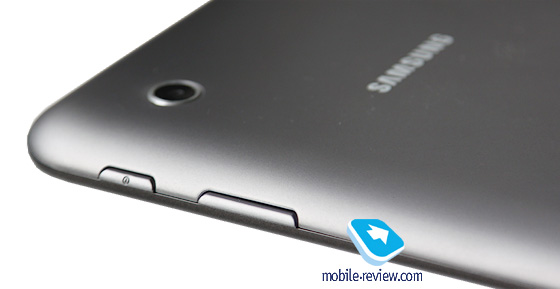
The right side accommodates the volume rocker and the power button. Their travel is short and soft, so the buttons are comfortable to use.

This one resembles many other Samsung tablets, and not only them actually.

On the left, we get slots for a microSD card and a SIM card (in 3G version). Both slots are covered with protecting caps that are perfectly fastened and don't seem to come loose in the future.

On the bottom, we can see the proprietary charging socket also used to connect the device to a PC. On both sides of it, there are speakers, covered with grids, and a microphone. The sound volume produced by the speakers is moderate, but if you hold the tablet horizontally, you may cover them with your hand.
On the top, we have a 3.5-mm audio jack and another microphone.
The entire front panel is occupied by the screen and a black bezel around it; the front camera eyelet and the voice speaker are above the screen.
The tablet also has a rear side camera. The backside itself is made of grey matt plastic that feels nice to the touch and is quite wear-resistant; no scratches appear on it. So we can be glad Samsung decided not to use their favorite glossy plastic for the backside of this tablet.
By the way, the white version of this model also hit the shelves not so long ago.
There are absolutely no complaints about the build quality, unlike the majority of low-end tablets that normally produce lots of creak and crackle, but we get nothing of the kind here.


Wednesday, April 18, 2012

Samsung Developing Handset for Windows Phone 8

Samsung is reported to be releasing at least one handset running Windows Phone 8, the upcoming new version of Microsoft’s mobile OS, codenamed Apollo.

According to UnwiredView.com – quoting Chinese website ePrice – Samsung Taiwan has confirmed that an Apollo-based phone will arrive in the second half of 2012. Unwiredview reckons this is not likely before October, as the new version of the WP operating system is not due until around then.
It may be one of three new Windows Phone devices from Samsung. Most of the world is waiting to see what the Korean giant does with the imminent Galaxy S3 handset, and other models in its ever expanding Android range, such as the Galaxy Note.

However, Samsung is clearly trying to keep a broad portfolio of products, while holding off from embracing Windows Phone as much as, say, Nokia with its Lumia range.


Samsung has previous form in this area. Last year it brought out the well-received Omnia 7, running Windows Phone 7 (Mango).

Monday, April 09, 2012

Samsung adds ‘blink’ feature to ‘Face Unlock’ to spruce up security


Face Unlock is one of the most talked about features in the latest version of Android, Ice Cream Sandwich (ICS). However, tech-blogs and phone reviewers have used it and also come out with ways to override this security unlock feature and get access to the phone.

As have been experimented, Face Unlock, unlocks phone even if you use a photograph of the user. This has been taken up seriously by Samsung and they have come up with a tweak to the feature that asks you to look into the front facing camera and blink as well to serve as an assurance of a living human being. This feature will be included in the custom version of ICS upgrade that will be pushed to Samsung’s devices in coming months.

The feature was announced on Samsung’s blog, Samsung Tomorrow, along with other company and product related updates.


[via]

Android 4.0 ICS on the Samsung Galaxy S ll Skyrocket – Video walkthrough


Lisa Gade from MobileTechReview walks through a leaked Samsung version of Android 4.0 Ice Cream Sandwich on the Samsung Galaxy S II Skyrocket.


Check the video walk through:


 Samsung Galaxy S II Skyrocket is slightly tweaked version of the standard Galaxy S II with 4G LTE on AT&T. Still no official word from AT&T and Samsung when official 4.0.3 update will be available to the public, but according to this review no major flaws have been found in the leaked build.

Friday, September 25, 2009

Samsung i5700 Galaxy Lite Leaks in Lime Green!


Different from what we saw in the previous leaked photo, the Samsung i5700 Galaxy Lite is leaked in a fresh color design. According to ai.rs, the production unit might not include the lime green design but instead use a more conservative colors. The Samsung i5700 will comes with a 3.2 megapixel camera, 1GB internal memory and microSD card slot. Check out the hardware preview video here!


[via slashgear]

New Samsung Rogue and the Samsung Intensity Messaging Phone


Verizon Wireless and Samsung this week announced the availability of two new messaging phones – the Samsung Rogue and the Samsung Intensity. The Samsung Rogue is a full touch screen phone that comes with a horizontal slide-out, four-row QWERTY keyboard, threaded messaging and one-touch access to popular social networking widgets, including Facebook, MySpace, Twitter, YouTube and Photobucket.

Following are additional key features and specifications for the Samsung Rogue.
  • Available in bronze/black color.
  • 3.1-inch ultra-brilliant touch screen.
  • Slide out horizontally to reveal a four-row QWERTY keypad.
  • Full HTML Web browsing capabilities with one-touch access to social networking sites via shortcut widgets.
  • Full messaging suite including SMS, MMS, Mobile IM, Mobile Email and Corporate Email.
  • 3.0 megapixel camera with flash and video capture and on-device editing capabilities
    microSD card slot.
  • File Viewer can view Microsoft Word, Microsoft Excel, Microsoft PowerPoint and Adobe PDF documents stored on a memory card.
The Samsung Intensity is a feature-packed phone that offers customers a convenient way to stay connected to family, friends, and anyone else their thumbs can get a hold of through its full line of advanced messaging capabilities such as Mobile IM; text, picture and voice messaging with threaded messaging feature; Mobile Email; and the Mobile Web browser.

Following are additional key features and specifications for the Samsung Intensity.
  • 2.1-inch display with horizontal slide-out four-row QWERTY keypad with dedicated Messaging key and Favorites key for easily texting and calling friends and family.
  • Mobile Web browser for Internet access.
  • Music player.
  • Full messaging capabilities including Mobile IM; Mobile Email; Chat; and text, picture, and voice messaging.
  • 1.3 megapixel camera with Night Shot, Self Timer, Multishot and Shutter Sound selection.
  • MicroSD card slot.
The Samsung Rogue is available today for $99.99 after a $100.00 mail-in rebate with a new two-year customer agreement, and the Samsung Intensity in Charcoal Grey is available today for $29.99 after a $50.00 mail-in rebate with a new two-year customer agreement. The Samsung Intensity in Flamingo Red is available beginning today exclusively online at no charge with a new two-year customer agreement.

Monday, February 16, 2009

Samsung and LG launch solar-powered cellphones!


Samsung and LG seem all set to unveil two solar-powered handsets next week. Samsung takes the initiative in launching Blue-Earth, powered by solar panels, placed on the back of the phone. Made from recycled plastic, this phone runs on energy-efficient Eco-Mode and flaunts an en-suite pedometer, dubbed Eco-Walk.

LG too has announced a new solar-powered phone, that’s a probable version of KF750 Secret. This handset will allow you to talk for 3 minutes for every 10 minutes of solar charge time. It will also be a bio-plastic-made cellphone.

No words on suggested pricing and availability as yet. So, stay tuned!

Via: Ecofriend

MWC 2009: Samsung Beat Disc Music Phone


Samsung Beat Music phone, which leaked sometime back has been made official today at the Mobile World Congress 2009. The Samsung M700's audio is powered by Bang & Olufsen, so you can guess how crisp and clear the audio will be. The phone is called Samsung Beat Disc Music Phone and has B&O's ICE amplifier thats gives you deep bass with crisp treble. As you can see in the picture, the phone's design has been inspired by the jukebox and apart from an impressive audio, the phone has a 2.6 inch touch screen with 3 mega pixel snapper. Other features include, slider mechanism for keyboard access, FM, Stereo Bluetooth, Music recognition and music tagging. Connectivity options include Wi-Fi and HSDPA connectivity.
via NAMP

Sunday, December 14, 2008

Samsung’s 8-megapixel camera phone, the Pixon, is announced

Rumors about the Samsung Pixon were popping up toward the end of last week, but now we’ve got our hands on the official information. The Pixon was announced today and it is to feature a much talked about 8-megapixel camera.


Specs include a 3.2-inch 240 x 400 WQVGA touchscreen, 7.2Mbps HSDPA, TouchWiz OS, a photo browser with accelerometer screen rotation, a media player, video capture, Bluetooth 2.0, USB 2.0 and an internal storage of 200MB which is expandable with microSD cards.

But the real highlight here is the 8-megapixel camera which is set to have wide dynamic range, face detection, advanced shake reduction and smile shot. Though no release dates are set in stone yet. Price at the moment is also unknown.

[via SlashGear]

Review: Samsung Epix

AT&T customers can now have a smartphone of “epix” proportions. AT&T and Samsung Mobile announced the availability of the Samsung Epix smartphone, an innovative new mobile phone featuring both an advanced touch screen and new optical mouse technology that is powered by AT&T’s 3G network, the nation’s fastest, and the Windows Mobile 6.1 Professional operating system.

Samsung Epix Smartphone
The Samsung Epix, which is available exclusively to AT&T customers in the U.S., provides users with a choice of ways to navigate its touch screen, including the first-ever implementation of optical mouse technology on a phone sold in the U.S. Located in the center of the device between the right and left soft keys, the optical mouse allows for quick and easy navigation by simply sweeping a finger over it. To make a selection, a single click will bring users to their desired location within the phone's menus. The optical mouse can also be switched to a four-way navigation key for more traditional navigation. For those who would rather interact directly with the touch screen, they can either use their finger to navigate or the Epix's built-in stylus for pinpoint accuracy.

Windows mobile smartphone
The Samsung Epix, which has a cool silver finish, follows a long line of robust and groundbreaking crossover smartphones from AT&T and Samsung Mobile. The Samsung Epix smartphone is a next-generation, sleek, stylish and compact mobile handset. It brings users the ease of use of a personal computer with Windows Mobile 6.1 to a slim pocket-sized device that is perfect for today's on-the-go mobile consumer.
Samsung Epix mobile communications
The Samsung Epix mobile phone also provides users with access to multiple e-mail accounts with Microsoft Direct Push for corporate users and AT&T Xpress Mail, which includes access to most major personal e-mail accounts. The Samsung Epix handset also offers over-the-air synchronization of contacts, calendars and task lists with Microsoft Exchange Server or Xpress Mail and support for Good Mobile Messaging.

Samsung smartphones
"The Samsung Epix provides AT&T customers with the choice of the cutting-edge capabilities of a touch screen and optical mouse combined with the convenience of a QWERTY keyboard," said Michael Woodward, vice president, Business Mobility Products for AT&T's wireless unit. "AT&T and Samsung have had a very successful history of bringing innovative smartphones, such as BlackJack and BlackJack II, to market and the Epix is no exception. We're sure that the Samsung Epix smartphone will resonate equally well with AT&T customers."

Samsung business handset
"Samsung developed this mobile phone with the business user in mind," said Bill Ogle, Chief Marketing Officer, Samsung Telecommunications America. "Users want a device that they can take on the road with them. The Epix allows you to never miss a beat at the office, stay in touch with colleagues and family and enjoy entertainment."

Personal Computer with Windows Mobile software
With Windows Mobile 6.1, the Epix brings a powerful personal computer experience to a compact device. Microsoft Office Outlook Mobile keeps people connected with synchronization of schedules and contacts, Internet Explorer Mobile provides improved quick and easy Web browsing and Office Mobile enhances productivity with the ability to manage Word, Excel and PowerPoint documents. Additional Windows Mobile 6.1 features on the Epix include threaded SMS messaging, Internet connection sharing, mobile banking and Voice Command.

Samsung Epix Mobile Device Manager
The Samsung Epix also supports Microsoft's System Center Mobile Device Manager 2008, an enterprise-grade mobile solution for managing and protecting Windows Mobile 6.1 phones. Mobile Device Manager provides users with software distribution capabilities and security-enhanced access to company data while they are away from the office. "People increasingly need powerful phones to be able to stay in touch with their work and personal lives," said Todd Peters, vice president of marketing, Mobile Communications Business, Microsoft. "The Epix continues Samsung's tradition of sleek, versatile devices that appeal to our shared customer and adds to the already expansive portfolio of Windows Mobile phones on AT&T."

Samsung Epix smartphone functions
In addition to being a feature-rich communications tools, the Samsung Epix cell phone is a multimedia and entertainment powerhouse. Samsung Epix users have access to AT&T Mobile Music, an integrated, on-the-go music experience that delivers "your music, your way" by providing simple access to a robust collection of music content, including access to online subscription music content from Napster Mobile, XM Radio Mobile and more. For the visually oriented, CV (Cellular Video) from AT&T gives viewers access to thousands of video clips - news, sports, weather, entertainment, premium HBO Mobile content and more - via streaming video. Those who prefer full-length streaming video programming can access MobiTV.

Samsung Epix features
The Samsung Epix also includes features such as stereo Bluetooth technology, with stereo headset support, a 2.0 megapixel camera with video-capture capabilities, Windows Media Player 10 Mobile and microSD memory card slot for external storage of up to 32GB of data. The Epix also features a built-in 1800 mAh battery to ensure users can maximize their productivity and stay entertained.

Samsung Epix price & availability
The Samsung Epix (model : Samsung SGH-i907) will be available through select AT&T retail locations for $199.99 with a two-year service agreement and after a mail-in rebate.

Friday, November 14, 2008

Samsung L310 review | Introduction


Once again, Samsung have put a ladyphone on the market that fully aims at the needs of a woman, with both appearance and functionality. The Samsung L310 Allure is chic, elegant and attractively decorated with Zirconias. There is nothing left to desire as far as functions are concerned; the phone features an FM radio, MP3 player, 2 Megapixel digital camera and rather typical; a shopping list. Samsung created the L310 to add to a luxurious lifestyle. In addition, the phone comes with an exclusive clutch, designed by makeup artist and hairstylist Leco van Zadelhoff. Our findings can be read in the following Samsung L310 review.


Samsung Allure retail sales box
The oblong, black box that holds the Samsung L310 is as elegant as the mobile phone itself. A thin carton cover with cut-out forms accentuates the patterns on the package. Inside you will find the Samsung L310, with manuals in two languages, a quick charger, a USB cable for data transfer through the USB 2.0 connection and a software CD. In addition, you will find a headset in one of the four boxes inside. Unfortunately a protecting cover is not standard included; you will have to purchase one yourself if you’re afraid of getting the phone scratched and damaged. On the other hand; Samsung do deliver a nice addition aiming especially at the target group; a clutch. The latter is an evening bag, especially designed by the successful makeup artist and hairstylist Leco van Zadelhoff. The design of this shiny, black clutch with gold-coloured details fits in seamlessly with the design of the Samsung L310. This clutch has five pockets inside and a small mirror, and will undoubtedly serve many women whilst having a night on the town.


Samsung L310 lady phone design
What else would we expect from a lady phone; the Samsung L310 has a feminine appearance and a sleek design without making use of the colour pink! The nice decoration with Zirconia stones around the camera lens, the gold-coloured stripe around the black housing and the flowery ornament around the monitor and on the back of the phone, give this clamshell model its womanly characteristics. These flower ornaments are also placed on the top lid, showing a ‘heartbeat’, flashing continuously. If you place the Samsung L310 within sight and the ‘heartbeat’ is on, it might distract you tremendously. I had to glance continually to see what was happening, and if something was happening. So if you are as easily distracted as I am, you’d better turn off this light in the settings menu. Unfortunately, this also turns off the small envelope icon that appears on the top lid when you receive an SMS text message. Upon opening the Samsung L310, the beautiful S-shape of the mechanism becomes visible. The inside of the lady phone has a gold-coloured layer and the keys are sunken into the surface of the Samsung L310.


Samsung L310 TFT monitor
The Samsung L310 Allure features a 262,144 pixel colour TFT LCD monitor. With its resolution of 176x220 pixels, the monitor seems rather small in relation to the lid. A pity not all the space was used but there had to be room for the ornaments. Other than that, the monitor is bright and detailed. If you find the numbers too small when pressing the keys to make a call, you can change the text size in display settings. The standby mode offers two options; the regular and dynamic background. The dynamic background shows a peaceful landscape with a windmill in it. During daytime, you will see birds flying through your screen at intervals, and at night, you can watch the falling stars in between the clouds and make a wish if you like. Reproduction of a missed call and receiving an SMS text message is accompanied by a colourful show of fireworks. These details increase the fun of using the Samsung L310.


Samsung Allure L310 menu
The left function button will give you access to the main menu. When scrolling through the menu, it strikes you immediately that the Samsung L310 remembers which menu you last visited. Upon opening the menu again, the last viewed submenu or the last used option is selected. I find this very convenient, when trying out an option you’re able to check the effect of a certain setting whilst still easily returning to the particular option when it is not what you thought it would be. The menu is livened up with one of the available themes; “Peach-coloured bubbles” or “Gold Ivy”. Display settings allow for choosing how the switch between the menus is displayed, in which case ‘Door’ slides open the menus, as it were, and ‘Dia’ slides the menus away to the right or to the left. Finally, you enter ‘My Menu’ upon pressing the top navigation button. Naturally, you can collect all your favourite options in one spot, for optimal user’s ease.


Samsung L310 Allure operation
The buttons of the Samsung L310 lay, as mentioned before, sunken into the surface of the phone, which adds to the design of the handset. The navigation and function buttons take up lots of space on the key panel. Personally I would have preferred the most frequently used buttons to be somewhat more compactly situated. Upon entering a phone number, a fountain pen appears and the windmill that is displayed in the dynamic standby mode becomes a postcard in the background. The Samsung L310 offers suggestions from your phone book, so when you insert a familiar number you only have to submit it partially. In order to save energy, you can opt for the setting that offers an active lightened keypad in the evening or at an adjusted time. The volume buttons on the side of the Samsung L310 allow you to adjust the volume during a call or while listening to music. In addition, you can assign desired quick links to the navigation buttons, except for the top navigation button. The latter can only be used for ‘My Menu’.


Samsung MP3 player & Radio
The Samsung L310 Allure lets you enjoy your music through the MP3 player that enables making play lists, among other things. You can also repeat songs or you can opt for ‘random’, offering a random selection of your songs to play. The navigation button serves to operate the player, it is mentioned as to which button serves for which operation. A huge plus is the built-in FM radio that the Samsung L310 features. To be able to use the radio, you have to connect the headset, which functions as antenna. The loudspeaker function lets people around you enjoy your music with you. However, because of the sound quality, I’d recommend using the headset for both the MP3 player and FM radio. Due to the fact that the loudspeaker is placed on the inside of the top lid of the phone, the sound gets muffled when you shut the cell phone. The Voice recorder in the Extras menu can be used to quickly record voice notes.

Samsung L310 ladyphone
Like previous lady phone editions of Samsung, the L310 also offers various functions that are especially interesting for women. These functions are found in the submenu Extras and are called ‘Lifestyle’. A questionnaire will help you find out what fragrance type you are. For example, if you love the deep blue sea, enjoy life and beautiful things, the Sea fragrance might be your type of fragrance. And if you’re not feeling well and you wonder why, you can use the Biorhythms function. It will tell you all about your physical, emotional and intellectual state at a certain day. With the Samsung L310 in your possession, you never again have to worry about having left your shopping list at home while standing in the shop, and you also have five shopping bags at your disposal that this lady phone offers. Besides that, you can monitor your daily activities to see how many calories you burned that day. The section lifestyle has a certain fun factor. Some function can actually come in handy, the shopping list for example, others shouldn’t be taken too seriously.

Samsung Allure with 2 Megapixel Samsung digital camera
The Samsung L310 Allure features a 2.0 Megapixel digital camera with 4x digital zoom and a CMOS sensor. The applied CMOS technique is energy-saving for this device, which adds to the battery-life. In daytime the camera takes good and reasonably sharp pictures that show surprisingly true-to-nature colours. In badly lit circumstances, the camera performs considerably worse as far as colour rendition and sharpness are concerned. The lack of the flash is cause for this and it is a real minus. Exposure correction might be the solution, however, only when a small correction is required because if a lot of compensation is needed, there’s no way of saving the picture. Increasing the ISO value might be a better option in that case. Unfortunately noise peeks around the corner when ISO is increased. It’s therefore up to the user to decide between colour quality, sharpness and noise. The shutter lag is around two seconds which I find acceptable since I don’t expect any better from a mobile phone. But I am not saying that there’s no improvement possible here, though. The possibility of setting the correct white balance is also enabled on the Samsung L310’s camera. Last but not least; you should set the viewing mode to ‘Reproduction standard ratio’. If you set this mode to ‘Full reproduction’ the composition of your end result will differ tremendously to what you see on the monitor whilst taking a picture. Even editing of pictures is possible in the Extras menu, and you can make adjustments such as adding effects, frames and emoticons.

Source

Review: Samsung L870

Samsung Electronics introduces the L870, a S60 embedded Smartphone designed for a life-enhancing experience. With an exquisite stainless steel body fully packed with the most-up-to-date OS applications, Samsung L870 will upgrade both style and productivity in everyday life. Like a tailored pair of suit, every millimeter of the Samsung L870 is carefully custom-designed to match the user’s lifestyle. A magnificent stainless steel body softly brushed with elegant hairline pattern, and a 13.5mm slim and sleek outline, will perfectly complement every outfit and style. A minimalistic key pad that appears when sliding up, is deliberately designed to provide enough spaces between each keys to provide convenience.


Internet access via the Samsung L870 smartphone
Leveraging the capabilities of S60 platform, Samsung L870 brings full connectivity and application that surpass expectations for a handset device. The applications and features of the S60 software are not only easy to learn and use, but also enable maximum productivity. With Full-speed internet browser and more than 6,000 open applications are also compatible with Samsung L870 to customize the device for each individual's needs.

Samsung L870 with useful pre-installed applications
Samsung L870 features many useful Samsung pre-installed applications such as an advanced task manager Checkit, PIMs (Personal information manager) homescreen, Team manager and business card recognition function. With these applications, users will experience better time and life managing experience than ever.

3 Megapixel digital camera on the Samsung L870
Samsung L870 boasts many other latest applications and interfaces. Creative user interface (UI) featuring three different themes, 2.4-inch QVGA TFT display, a 3-megapixel camera, FM radio with RDS, music player and Bluetooth v.2.0 supports are all embedded within Samsung L870 for satisfying visual and audio entertainment needs.

Samsung L860 S60 mobile
"We are happy to compliment our product portfolio with yet another appealing S60 mobile, Samsung L870 that is fully customized with style, performance and user interface," says, Jongin Kim, the Vice President of Mobile Communication Division of Samsung Electronics. "With S60, we can successfully deliver the latest mobile technology with fully customizable applications and the intuitive user interfaces."

Samsung L870 mobile phone availability
Samsung L870 will first be launched in Europe around August, then will continue to be available in all regions where GSM is available.

Samsung L870 specifications
  • HSDPA (2100MHz) 3.6Mbps + EDGE/GPRS 900/1800/1900
  • 2.4" QVGA 16M Color TFT display
  • 3 Megapixel digital camera
  • Symbian 9.3
  • S60 3.2
  • New Thematic UI
  • Quick Office document viewer
  • Push Email (Visto, Seven, Intellysync, Good)
  • Advanced PIM Applications
  • Music Player (MP3, AAC, AAC+, RA, AMR, WMA)
  • Video Player (H.263 + AMR, MPEG4, Real One, WMV)
  • FM Radio (RDS)
  • Bluetooth v.2.0 EDR
  • USB 2.0 (Full Speed)
  • Memory : 100MB internal memory + Micro SD up to 4GB
  • Size : 103.5 x 50.5 x 13.5mm

Wednesday, July 30, 2008

Review: Samsung Armani P520

Samsung Armani review
Fashion is more than the way we dress, as Giorgio Armani states. To meet the growing demands for consumer electronics, Giorgio Armani developed aStylish Giorgio Armani mobile phone n advanced mobile phone, in cooperation with Samsung, with a unique appearance, also known as the Samsung P520. Luxury, elegance and simplicity are Giorgio Armani's key features and they also characterize the Samsung P520. Samsung's experience in the field of user-friendliness certainly shows with this device. The enhanced digital camera, MP3 player, astonishing graphic effects and famous brand name, make the Giorgio Armani cell phone a desired gadget, especially for the younger generation.

Samsung Armani retail box
Not only is the Giorgio Armani mobile phone a stylish device, it is also delivered in style. The black box has a silky feel, like the cover of the user’s guide. A leather pouch that folds out comes with the phone to protect it. When you shut the cover, it shuts down the cell phone. You can also choose to use the included pouch made from soft material. Naturally a battery charger, USB cable, earphone and software CDs are included in the box. An original addition is the soft cleansing cloth, marked with the Armani logo, which serves to wipe the Samsung P520 clean.
Samsung P520 cell phone design
The Samsung P520 has a businesslike and classy appearance also thanks to its durable, black housing carrying the Giorgio Armani logo. The dimensions of 3.5x 2.1x0.4 inches make the cell phone extremely compact and the full touchscreen enables optimum management. Thanks to its compact design you hardly notice the cell phone in your trouser pocket. On the front there are only two buttons available; the 'numeric key pad' and the 'on/off' or 'close menu' key. At first the Armani cell phone reminded me of a smartphone, also because of the visible agenda in standby mode, but as far as functionality is concerned, the Samsung P520 is a regular mobile phone. Buttons to operate the digital camera and to key lock are placed on the right side of the phone while the volume buttons can be found on the left side. Logically, the digital camera is found on the back of the Giorgio Armani cell phone.

Samsung P520 Touchscreen
The 2.6 inch 262,144 pixels colour TFT touchscreen dominates the front of the Samsung P520 Giorgio Armani phone. It is a heat-sensitive monitor functioning without stylus. The colours are clearly reproduced and while photographing, details are clearly visible thanks to the large monitor. The special sunlight mode enables you to see what's rendered on the screen even in bright sunlight without having to move into the shade in order to decipher your received text message. In general the monitor responses fast, but the model we tested seemed to have a less sensitive right side compared to the rest of the screen, which made it hard to select the scrollbar. At times I also had trouble touching the right buttons; although this might be a matter of simply growing accustomed to it and aiming well.

Samsung P520 phone menu
Straight from the standby mode you can switch the Giorgio Armani mobile phone to the silent mode and get access to the call screen or the main menu. The main menu has its very own style in the colours yellow and black. Two bars, a horizontal and vertical one, lead you along twelve icons, divided in a 3x4 grid. As we have come to appreciate from Samsung, all the menus and the submenus are logically arranged and everything is easy to find. Some menus have a scrollbar at their disposal but it is also possible to 'slide' your finger from the centre to the bottom of the screen to scroll through the menu. The quick access buttons that offer direct access to the call log, MP3 player, messages and contacts are accessible from every menu by pressing the small square.
Samsung Armani P520 digital camera
The Giorgio Armani handset has been equipped with a 3.15 Megapixel digital camera featuring a LED flash and a 4x digital zoom. In well-lit situations this camera captures sharp, bright pictures. On the computer screen, the red tones are a tad too present at times. Thanks to the mobile phone's large TFT screen you can focus on many details while shooting, which gives a good overview of the final result. The camera's basic settings such as white balance, resolution, effects and frames can be adjusted through the quick menu. In the main screen, you can directly activate or deactivate the flash and self-timer. Moving vertically over the screen with your finger, will activate the zoom function, whilst a horizontal movement results in adjusting the light intensity, presuming you hold the phone horizontally for a landscape picture. In 'camera settings' you can adjust quality, light metering and ISO values. In short, the Giorgio Armani mobile phone has many built-in possibilities 3 Megapixel digital camera that allow you to take nice pictures.


Giorgio Armani MP3 player
The Samsung P520's MP3 player features the same graphics as the main menu and the basic functions can be operated by two bars. When you slide the vertical bar, you wind or rewind a song. To adjust the volume you have to slide the horizontal bar. On the crossing of the two bars the play/pause button is positioned. This neat, original reproduction makes it a joy to arrange your music. Furthermore you can repeat songs automatically, create playlists and sort music to artist, album genre and composer. The MP3 player remains active in standby mode providing you set this mode in the play setting menu. The headset as well as the loudspeaker produces a reasonable sound.

Samsung P520 mobile phone functions
With the aid of the common agenda you can manage your dates, remember birthdays and tick off tasks. The four available alarms and an alarm clock give you no excuse anymore to oversleep, unless of course you press 'OK' instead of 'Snooze' when the alarm wakes you. That way, I can assure you, the alarm will not go off again! In addition, the Samsung P520 offers a timer, notebook, world time and a calculator. The speech recorder has the same beautiful graphic effects as the main menu and the MP3 player. A unique extra feature is the possibility to view Excel, Word and PDF files through the File viewer. You can also use the 'find' function to find certain specific words inside a document. Moreover, the Bluetooth connection lets you connect directly to an external Bluetooth printer.