Showing posts with label Review. Show all posts

Sunday, October 21, 2012

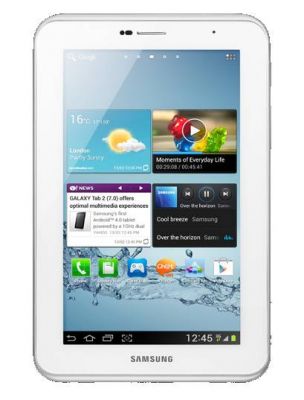
Samsung Galaxy Tab 2 7.0 Review


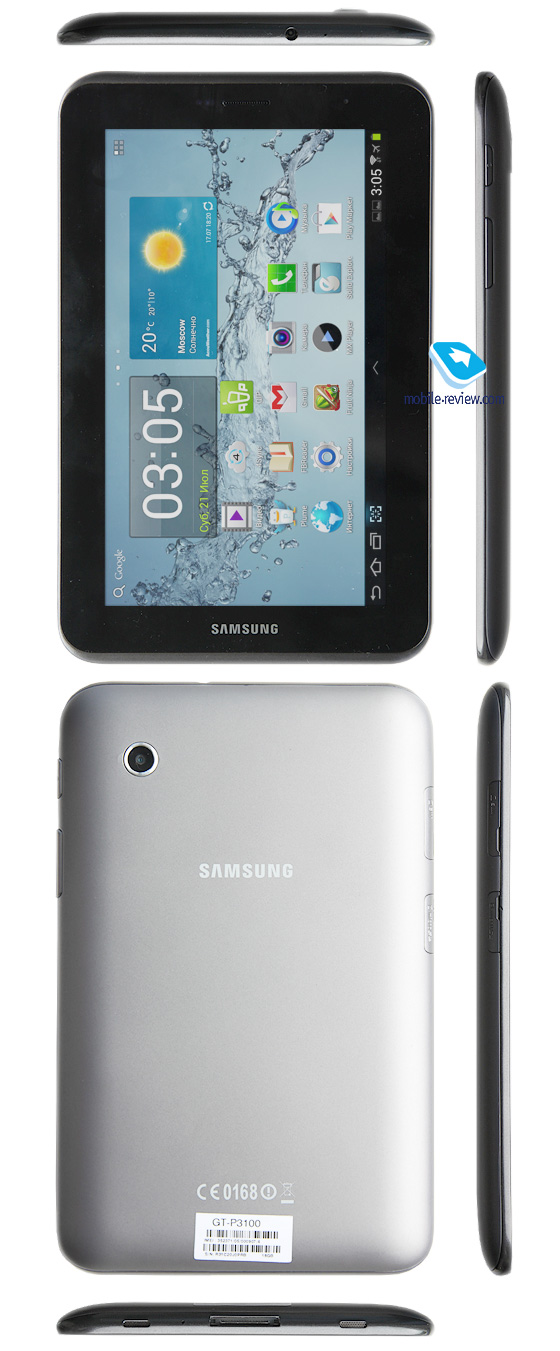
I like seven-inch tablets very much. They are compact and comfortable devices that can fit into a small bag or even into a jacket pocket. They are also more lightweight and less expensive than ten-inch models. The one we are reviewing here, the Galaxy Tab 2 7.0, represents a logical sequel and extension of the compact tablet lineup by Samsung.

Design, materials & controls
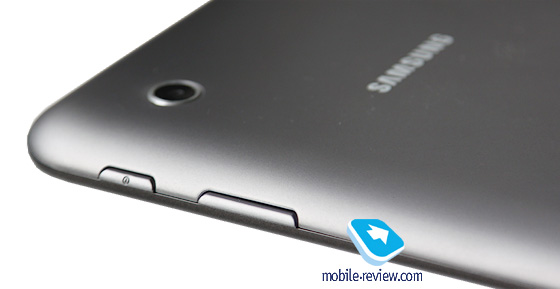
The right side accommodates the volume rocker and the power button. Their travel is short and soft, so the buttons are comfortable to use.

This one resembles many other Samsung tablets, and not only them actually.

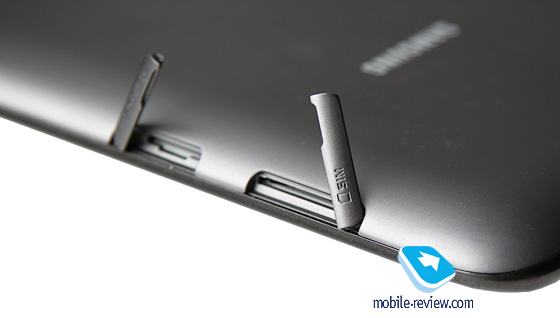
On the left, we get slots for a microSD card and a SIM card (in 3G version). Both slots are covered with protecting caps that are perfectly fastened and don't seem to come loose in the future.

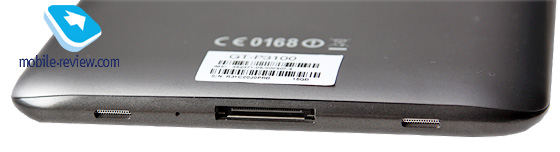
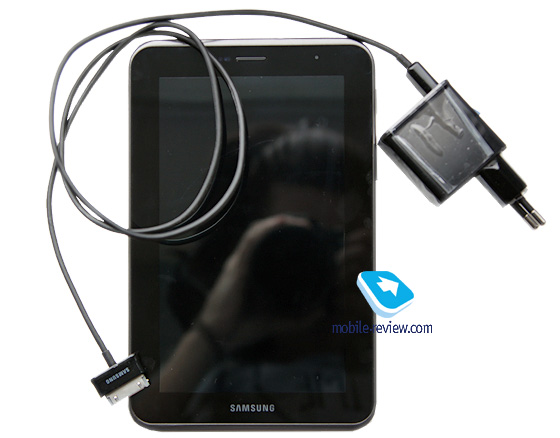
On the bottom, we can see the proprietary charging socket also used to connect the device to a PC. On both sides of it, there are speakers, covered with grids, and a microphone. The sound volume produced by the speakers is moderate, but if you hold the tablet horizontally, you may cover them with your hand.
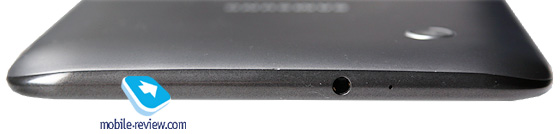
On the top, we have a 3.5-mm audio jack and another microphone.
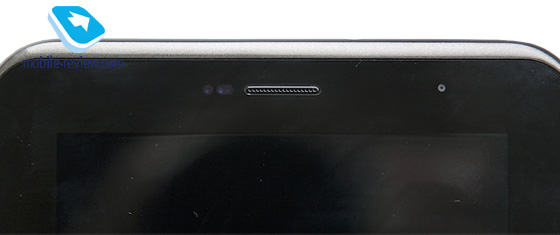
The entire front panel is occupied by the screen and a black bezel around it; the front camera eyelet and the voice speaker are above the screen.
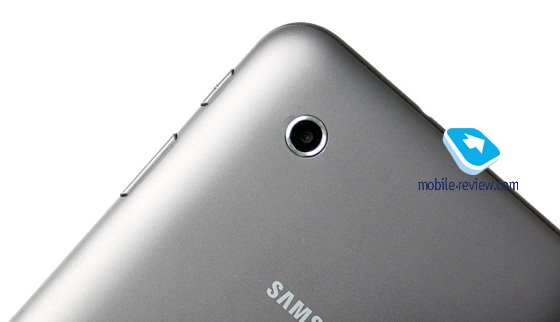
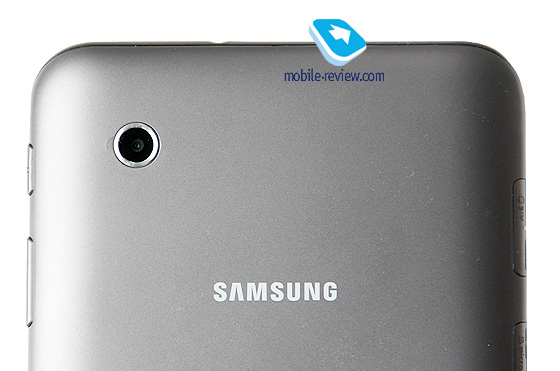
The tablet also has a rear side camera. The backside itself is made of grey matt plastic that feels nice to the touch and is quite wear-resistant; no scratches appear on it. So we can be glad Samsung decided not to use their favorite glossy plastic for the backside of this tablet.
By the way, the white version of this model also hit the shelves not so long ago.
There are absolutely no complaints about the build quality, unlike the majority of low-end tablets that normally produce lots of creak and crackle, but we get nothing of the kind here.


First Look. Sony LT30p Mint

Introduction
Sony wants to make a strong effort to return to the market as a player both with strong and numerous solutions. Xperia S created a uniqure situation for the company, with only one new device available for more than a month with the rest of the same line up appearing on most markets roughly four weeks ago. This time around Sony is trying to create as many devices as possible with many or just a few differences betweebn them offered at different prices to offer one device for every consumer.
LT30p belongs to this new crop of models and along with Sony Tipo and a couple of other new handsets, which are also to be presented also tries to differentiate itself from the design philosophy that was used in Xperia S and all its junior sibblings. Lt30p aims at the high end maket to be placed as Sony's flahsgip for the third quarter of the year. While practically replacing Xperia S in that place, it has very few similarities both in terms of design and features.

Wednesday, April 11, 2012

Nokia Lumia 900 vs HTC Titan II – Video comparison


Lisa Gade from MobileTechReview compares newest smartphones running Microsoft’s Windows Phone 7.5 software, the Nokia Lumia 900 and the HTC Titan II


Nokia Lumia 900 has a 4.3 ClearBlack AMOLED display, 16GB storage, an 8 megapixel rear camera with Carl Zeiss lens, a front video chat camera, FM Radio, WiFi, Bluetooth and a GPS. It runs on a 1.4GHz Qualcomm Snapdragon CPU, 4G-LTE capable radio and an 1830 mAh battery.

The HTC Titan II features a 1.5 GHz single-core Scorpion CPU, 4.7-inch display with 480×800 pixels, 16-megapixel camera with 720p HD video recording, a front-facing camera, 4G-LTE capable radio and a 1730 mAh battery.


Both phones are available exclusively in the U.S from AT&T.
Check the video comparison:

Monday, April 09, 2012

Nokia Lumia 900 – Video Review

Nokia Lumia 900 is latest Nokia Windows Phone flagship and will be available exclusively in the US from AT&T on April 8th. It has a 4.3″ ClearBlack AMOLED display, 16GB storage, an 8 megapixel rear camera with Carl Zeiss lens, a front video chat camera, FM Radio, WiFi, Bluetooth and a GPS. It runs on a 1.4GHz Qualcomm Snapdragon CPU.

HTC One X – Video Review


Aaron from PhoneDog reviews the global version of the One X, HTC’s newest Ice Cream Sandwich flagship smartphone.

Here are some basic specs, HTC One X features a  4.7″ HD S-LCD 2 screen, 1.5 GHz quad-core NVIDIA Tegra 3 processor, 1GB of RAM, 8MP ImageSense camera, front facing camera, 1,800 mAh non-removable battery, and Android 4.0 (ICS) with HTC Sense 4.

Check the video review:


[via]

Sunday, January 04, 2009

Review: Nokia E71

The time a business mobile phone was simple and boring is in the past. Business and private are being united. The genuine corporate mobile companies such as the BlackBerry creators, aim more and more at the private user, whilst Samsung and Nokia in turn serve the business user Business cell phones of Samsung are found in the i-series. Nokia serves the business user with their E-series. In addition to a compact slider, the E66, Nokia has introduced the E71. Nokia business phones have a neat design and feature many functionalities. That's the reason more and more private phone users end up going for a mobile phone from the corporate segment.


First impression of the Nokia E71 handset
The Nokia E71 cell phone stands out for its efficient design. The package is carried out in red and white, and the handset is displayed. It's easy to recognize the Nokia E71 by its full QWERTY keyboard, the metal/aluminum coating and the slim design. Standard included together with the Nokia E71 are a battery charger, a headset, a pouch, a software CD and the users guide. The sleek back of the cell phone looks somewhat scratch-prone, however, it doesn't seem too bad, although sticky fingerprints are left behind on it constantly. Other than that, the cell phone has an attractive appearance.


QWERTY keyboard of the Nokia E71
The full keyboard the Nokia E-71 features, is rather small, yet operation is quite easy thanks to the round buttons. It does take time getting used to them, although with a bit of practice you should soon be able to type fast using two fingers. This facilitates sending text messages and e-mails with this phone and makes it more appealing. Thanks to the compact design of the keyboard, the Nokia E71's width has been kept nicely in proportion.

Nokia E71 with Symbian OS software
Nokia also chose Symbian as the operating system for the Nokia E71. Usually, this is the standard for the corporate E-series and the popular N-series of Nokia. The version used on the E71 is Symbian S60 3.1 Edition. The disadvantage of Symbian software is that it unfortunately tends to slow down the cell phone, which is what we experienced with the Nokia N96 for example. Surprisingly, the Nokia E71 doesn't suffer from any delay, the mobile phone works fast and smooth.

Nokia E71 Symbian smartphone
The menu has become more straightforward and simple when it comes down to graphics, which might be why it is faster. The structure and use of the E71 menu is similar to other Symbian mobile phones. The menu works via clear icons. In addition, installing external software is also enabled. New is the dual desktop; one for business use and one for private use. Backgrounds and shortcuts can be adjusted and added. Pressing the button on the main screen once changes the desktop. A nice addition!

Nokia E71 voice aid
The Nokia E71 supports voice aid. Not only voice dial, as we know from many mobile phones; the E71 offers a fully spoken menu. Recent calls, contacts and, for example, the time are read out loud. This menu is available at instruments and is very convenient for someone that is visually disabled. At the same time however, I doubt whether the Nokia E71 mobile would be a convenient phone for this person.
Nokia E71 3.2 Megapixel digital camera
The Nokia E71 phone features an integrated 3.2 Megapixel digital camera. Furthermore, the mobile phone also has a LED flash at its disposal, to enable shooting pictures in badly lit circumstances. The monitor is quite large and entirely used as viewfinder. The camera is quick in capturing a picture and the application start-up time is fast too. After capturing the picture it is not reproduced completely sharply on the screen which is rather annoying since it makes you think that you failed in capturing the object.

Taking pictures with the Nokia E71
In some cases the pictures turn out well, although certainly not always. If there is insufficient environmental light, the pictures become blurred very fast and they show a lot of digital noise. It is almost impossible, even in close-up mode, to capture an object from close-by. The camera does respond extremely fast, however, it seems like it skips focusing. In case of correct exposure and a larger distance, like a building in broad daylight, the pictures turn out reasonable. The camera leaves a lot to be desired and it is clear the camera did not have priority on this phone.
Nokia E71 Multimedia
Besides being a smooth business mobile phone, the Nokia E71 also features various multimedia applications. Media contains Realplayer, the camera, Musicstore, picture gallery, voice recorder and a Flash player. Music and video are perfectly reproduced on the E71. The media player looks fine and neat. The monitor is not that large, but is instead quite wide and this is very convenient for video files, since nowadays many wide screen films are available. The built-in speaker delivers a nice sound however, to fully enjoy your music, you ought to use the included stereo headset.

Nokia E71 memory
The internal memory of the Nokia E71 counts 110MB. The memory is expandable with the use of a microSD/SDHC memory card. Standard included is a 2GB memory card offering more room to multimedia files. If 2GB is insufficient, you can purchase a memory card with a larger capacity, since the Nokia E71 supports memory cards up to 8GB. Memory cards are placed on the side of the Nokia E71 which makes it possible to switch the card without having to turn the mobile phone off.

Microsoft Office support
Standard support for Microsoft Office files is not a superfluous luxury on a corporate mobile phone. Quickoffice is found in the menu, with which all Microsoft Office files can be opened or even created. The latter is not the case for all supporting Microsoft Office phones. In addition to Microsoft Office files, the Nokia E71 is also able to display Adobe PDF files. Viewing Excel files actually was the easiest to do. The monitor seems a tad too small for the other documents, which makes you have to scroll the whole time. However, opening and editing your files on the move has been made possible.

HSDPA internet on the Nokia E71
The Nokia E71 supports HSDPA and Wi-Fi. This makes Internet available for the user at all times. Thanks to the HSDPA support, exploring the Internet is appealing too whilst on the road, since it offers a reasonable speed providing the network is actually able to handle the speed. The built-in Internet browser works fine, although the wide screen monitor is not always convenient for reproduction of the Internet pages.

Nokia E71 GPS receiver
The built-in GPS receiver in combination with the Nokia Maps application can be used as navigation system. However, this does require purchasing a license beforehand. Finding the required satellites to stipulate the position takes a tad too long at times. Installing a different software program such as TomTom is also possible.

Nokia E71 battery
The included 3.7V 1500mAh Lithium Polymer battery is able to last for a maximum of 410 hours standby and a talk-time of 10.5 hours. The standby time exceeded the expectation; I was able to keep the E71 standby for 5 days with average use. This battery is definitely stronger than I am used to from other Nokia mobile phones.
Nokia E71 software
Nokia has included the well-known PC Suite software with the E71. This software offers copying files to and fro the Nokia E71, managing contacts, synchronizing the agenda and making back-ups, thus reducing chances of data loss. It is easy-to-use software, however, nothing new under the sun.

Sunday, December 14, 2008

Review: Nokia N97

Nokia unveils the Nokia N97, the world's most advanced mobile computer, which will transform the way people connect to the Internet and to each other. Designed for the needs of Internet-savvy consumers, the Nokia N97 combines a large 3.5" touch display with a full QWERTY keyboard, providing an 'always open' window to favorite social networking sites and Internet destinations. Nokia's flagship N97 mobile device introduces leading technology - including multiple sensors, memory, processing power and connection speeds - for people to create a personal Internet and share their 'social location.'


Nokia N97 multimedia phone
"From the desktop to the laptop and now to your pocket, the Nokia N97 is the most powerful, multi-sensory mobile computer in existence," said Jonas Geust, Vice President, heading Nokia Nseries. "Together with the Ovi services announced today, the Nokia N97 mobile computer adjusts to the world around us, helping stay connected to the people and things that matter most. With the Nokia N97, Nseries leads the charge in helping to transform the Internet into your Internet".

A-GPS integrated in the Nokia N97
The Nokia N97 introduces the concept of 'social location'. With integrated A-GPS sensors and an electronic compass, the Nokia N97 mobile computer intuitively understands where it is. The Nokia N97 makes it easy to update social networks automatically with real-time information, giving approved friends the ability to update their 'status' and share their 'social location' as well as related pictures or videos.

Nokia N97 features a tilting touch display
The home screen of the Nokia N97 mobile computer features the people, content and media that matter the most. Friends, social networks and news are available by simply touching the home screen. The 16:9 widescreen display can be fully personalized with frequently updated widgets of favorite web services and social networking sites. The Nokia N97 is also perfectly suited for browsing the web, streaming Flash videos or playing games. Both the physical QWERTY and virtual touch input ensure efficiency in blogging, chatting, posting, sending texts or emailing.


Nokia N97 boosts a 5 MP digtal camera
The Nokia N97 supports up to 48 GB of storage, including 32 GB of on-board memory, expandable with a 16 GB microSD card for music, media and more. This is complemented by excellent music capabilities, full support for the Nokia Music Store and continuous playback time of up to 1.5 days. The Nokia N97 also has a 5 Megapixel digital camera with high-quality Carl Zeiss optics, 16:9 and DVD quality video capture, and support for services like Share on Ovi for immediate sharing over HSDPA and WLAN.

Nokia N97 price & availability
The Nokia N97 camera phone is expected to begin shipping in the first half of 2009 at an estimated retail price of 550 Euro before taxes or subsidies.


[Source]

Review: Nokia 8800 Arte

Nokia's 8800 Arte is not a low cost mobile. SIM-free you are looking at anything from around £600 to more than £700 from the well-known outlets. For instance, while writing this review I found it for between £199.99 and £499.99 on O2 depending on your contract choice and for £209.99 to £399.99 on various Orange contracts.

Its near twin, the 8800 Arte Sapphire, is an even pricier option coming in at over £800 SIM-free. I can only surmise that the latter's leather trimmings and the real sapphire that sits at the centre of the navigation button are to blame for the hike, because inwardly the phones seem identical. As always, though, prices do vary wildly so it's worth shopping around if you simply must have that gemstone.


Both phones are powered by the S40 operating system. This means they are less sophisticated than some other Nokia handsets, and it is the design that you are paying all that dosh for. Oh, and a rather stylish Bluetooth headset, a desktop stand and a leather slipcase.

Whether the design and extras justify the price is up to you, of course. I'm not convinced, but then again both the 8800 Arte and the 8800 Arte Sapphire do have a rather nice minimalist look. I don't usually go for bronze but in this case the bronzing of the 8800 Sapphire Arte is eye catching, and the black of the 8800 Arte is, well, black which tends to make for a good, sleek look.


There is nothing on the front of the slider design apart from the screen and navigation key until a call comes in, or you open the slide. At this point two pairs of vertically stacked buttons light up. On the left the pair offers a softmenu and Call function and on the right they house a softmenu and End function.

There are no shortcut buttons around the edges of these handsets. Instead the black of the Arte and the bronze of the Arte Sapphire are complemented by a band of silver all around the edge. This picks up horizontal silver banding on the front and back of the casing. With no side buttons you access the camera from the main menu and adjust the volume using the navigation button.

In an interesting first, you can mute the phone when a call is coming in simply by turning it face down on the table. That is great psychology: ‘No, I don't want to talk to you, and actually I don't even want to see that you are calling'.

A microUSB connector is used to link the handset to your computer and to charge the battery. Anyone used to carrying a miniUSB charge cable for several devices will need to also carry the microUSB one required here.

The 8800 Arte and Arte Sapphire have a metal and glass shell and this means they are quite heavy phones at 150g. With many similarly sized mobiles a third lighter, you are likely to notice the weight in your pocket.

I'm going to stop differentiating between the Arte and Arte Sapphire and refer to both phones as the 8800 because the remainder of the specifications are identical.


Holding either phone in the hand is a satisfying experience. The 8800 has a thin candybar design measuring 109mm tall, 46mm wide and 15mm thick. Flick up the slide and the phone grows to about 133mm tall.

However, the number pad is quite squeezed. Its keys are reasonably wide but very short. They are shaped with a raised bottom edge, which makes hitting them a little less troublesome than it would be if they were flat, but texting at speed was still not easy. If you have stubby fingers you might also find things too cramped for comfort.


There is 1GB of internal storage but no flash memory card slot to add more. I find mobiles without memory expansion harder and harder to fathom unless they are at the entry level. Who wouldn't prefer to pop a microSD card to get photos or music on and off their handset over having to physically connect it to a computer or use Bluetooth?

On the software front there are some goodies to be found. Opera Mini is here, for a start. And while viewing Web pages on the 2-inch OLED screen might be a challenge to some, downloading pages should be fine as the handset is 3G, with tri-band GSM, GPRS and EDGE as fallbacks.

You could always opt for WidSets instead. This is a sort of RSS-like service, pushing new content out to your handset whenever a change is detected in a Web site. Web sites need to be in the scheme and offer a WidSets service; you need to have a data plan and to be able to justify the download costs; and you need to really want to see every change to a web page. If those three things triangulate, then WidSets could be very useful.

As you would expect, the 8800 plays music and takes pictures. Bizarrely for such an expensive phone a wired headset is not supplied. And there is no support for a 3.5mm jack. All you have for wired sound output is that microUSB slot I already mentioned. Playback through the loudspeaker is quite loud. Unfortunately it also distorts at the higher volumes. On the other hand, battery life was good. I got 8 hours 50 minutes of music playback from a full charge.


The camera has auto focus and shoots at resolutions up to 3.2-megapixels. It has no flash or self-portrait mirror. Image quality was generally acceptable, but not as good as I'd expect from a mobile of this price.
The coloured dish, shot indoors under normal household lighting, is grainy, though the colours are reproduced quite faithfully. The white chair is again accurate on the colour front, but the detail is not wonderful with some noticeable lens distortion at the edges. The flowers show how the camera functions for closer shots. Not too hot, in my opinion, with the autofocus missing the main subject of the composition.

Verdict
For all of Nokia's efforts to brand the Arte and Arte Sapphire as high class mobiles there simply isn't enough here to justify the price. Distortion from the loudspeaker, a below par camera, no front camera for two-way video calls, and the S40 OS with its reasonable but not wonderful set of features are not top-notch specifications.

Review: BlackBerry Storm

Verizon Wireless, Vodafone Group and Research In Motion announced that the BlackBerry Storm mobile phone will be available later this fall, exclusively to Verizon Wireless customers in the United States and Vodafone customers in Europe, India, Australia and New Zealand. Designed to satisfy the needs of both consumers and business customers, the BlackBerry Storm smartphone combines the powerful communications features, global connectivity and personal productivity advantages of the BlackBerry platform with a revolutionary touch-screen technology that dramatically enhances the touch interface and enables easy and precise typing.

BlackBerry Storm smartphone
The world's first ‘clickable' touch-screen responds much like a physical keyboard and also supports single-touch, multi-touch and gestures for intuitive and efficient application navigation. In the U.S., Verizon Wireless customers will benefit from the nation's most reliable wireless voice network and the pervasiveness of Verizon Wireless' reliable high-speed 3G Evolution-Data Optimized (EV-DO) Revision A (Rev. A) network for rich Internet browsing and multimedia applications. In Europe, India, Australia and New Zealand, Vodafone will support customers with its high speed 3G mobile broadband networks and the power and reach of the world's leading international mobile communications group.

Revolutionary touchscreen smartphone
"We are proud to introduce the first touch-screen based BlackBerry smartphone together with Verizon Wireless and Vodafone," said Mike Lazaridis, president and co-chief executive officer at RIM. "The BlackBerry Storm is a revolutionary touch-screen smartphone that meets both the communications and multimedia needs of customers and solves the longstanding problem associated with typing on traditional touch-screens. Consumers and business customers alike will appreciate this unique combination of a large and vibrant screen with a truly tactile touch interface."

3G BlackBerry Smartphone
"The BlackBerry Storm mobile phone offers our customers more ways to stay connected to both their personal and professional lives - whether in their community or around the globe," said Mike Lanman, vice president and chief marketing officer of Verizon Wireless. "The BlackBerry Storm combines the reliability of our 3G network with the dependability and network efficiency of the BlackBerry platform to deliver our customers the ultimate wireless experience - all in one of the coolest smartphones available on the market today."

BlackBerry handsets
"We are delighted to bring the power of the purpose built BlackBerry Storm, directly into the hands of consumer and business customers," says Frank H Rovekamp, global chief marketing officer, Vodafone Group. "With its unique clickable touch-screen, giving access to all the desirable multi-media features and services such as browsing, music and video, turn by turn satellite navigation, messaging and social networking, and BlackBerry's mobile heritage and strong business reputation, the BlackBerry Storm is being brought by Vodafone into the consumer world. With Vodafone's ultra high speed, reliable mobile network and this exclusive and exciting new smartphone, there has never been a better time to be with Vodafone."

Innovative touchscreen phone
The BlackBerry Storm smartphone comes with an innovative touch-screen that actually depresses ever so slightly when the screen is pressed. The user distinctly feels the screen being pressed and released with a gentle 'click', similar to the feeling of a key on a physical keyboard or a button on a mouse. The ‘clickable' touch-screen gives the user positive confirmation that they have made a selection and the result is a dramatically enhanced touch interface and a highly intuitive typing experience.

BlackBerry navigation keys
In addition to the familiar navigation keys (‘phone', ‘menu' and ‘escape') that are common to other BlackBerry smartphones, the new BlackBerry Storm adds support for multi-touches, taps, slides, and other touch-screen gestures, so customers can easily highlight, scroll, pan, and zoom for smooth navigation. The BlackBerry Storm smartphone also features a built-in accelerometer, allowing its touch-screen to automatically switch between landscape mode and portrait mode as the user rotates the handset - RIM's SureType keyboard layout is available in portrait and a full QWERTY keyboard layout is available in landscape mode. Other relevant features, such as cut and paste, are only a touch away for the ultimate smartphone experience.

World Class BlackBerry Smartphone
The BlackBerry Storm handset is a top of the line 3G mobile phone with premium features and global connectivity. In the U.S., the BlackBerry Storm 9530 gives Verizon Wireless customers 3G EV-DO Rev. A/CDMA - technology - and (2100Mhz) UMTS/HSPA and quad-band EDGE / GPRS / GSM for global use. The BlackBerry Storm 9500 from Vodafone supports (2100Mhz) UMTS/HSPA and quad-band EDGE / GPRS / GSM networks.

Black Berry Storm internet features
Customers will enjoy a full HTML high performance browser that works in either portrait or landscape orientation. Navigating Web sites is fast and easy with the touch-screen interface that lets users double tap to zoom in and slide their finger to scroll and pan. Icons along the bottom of the display allow for quickly accessing web sites, switching between "Page View" and "Column View" as well as the ability to toggle between "Pan" mode and "Cursor" mode. The enhanced browser supports file downloading, streaming audio and video (RTSP), and with its built-in RSS support, new content from supported Web sites can be automatically pushed to the user.

BlackBerry Storm price & availability
The BlackBerry Storm smartphone brings the full power of the industry's leading mobile e-mail and messaging solution without compromise. It supports personal and corporate e-mail, text (SMS) and picture messaging (MMS), instant messaging on the most prevalent consumer and enterprise platforms, as well as easy access to popular social networking sites.

Review: Nokia N810 | Introduction

Mobile Internet is gradually becoming more important. The number of people using their mobile phone to find information about the weather/traffic, or to send and receive emails, is growing by the day. Nokia meet the demand for multimedia devices with their N-series. The handsets belonging to these series are perfectly suitable for Internet access, making video calls, navigation and many more functions. Generally, surfing the Internet on a small device such as a mobile phone works fairly well, however, if you frequently use the Internet, you do notice the lack of a full keyboard and touchscreen on the Nokia phones. Nokia aims at a different target group with the Internet Tablet. The device may be considered a small notebook that enables you to use the Internet and email functions. Making calls is possible only through Skype.

First impression with the Nokia N810 tablet
The Nokia N810 Internet Tablet comes in a simple package with a picture of the device displayed on it. Furthermore; the type name is clearly mentioned all around the package. Inside it, there are several layers; the top layer shows a picture with an opening in which the Nokia N810 is visible, presenting its full QWERTY keyboard. At the bottom you will find a box with more accessories. Nokia standard deliver a car holder, a pouch, a battery charger, a connectivity cable, a headset, two stylus pens and instruction manuals. You might say it's a fully delivered device.

Nokia N810 Internet tablet touchscreen
The Nokia N810 features a large 4.1 inch (480x800) wide touchscreen which can be operated with your finger as well as the included stylus pens. The stylus pen comes in handy when dealing with somewhat more precise operations, such as dragging a file or changing a file name. It's easier to work with more precisely, compared to working with your finger, in which case you might just miss the right spot. The touchscreen responses very fast which ensures a user-friendly operation of the Nokia N810. Additionally, a slide button is placed on the top side of the device to lock both the keys and the touchscreen. Very convenient, as it prevents unintentional changing or deleting of items.

Placing applets on your start screen
When the device is closed, it leaves only the monitor visible. Furthermore, the topside of the Nokia N810 carries a number of buttons; a button to lock the screen, a button to turn the device on and off, the volume buttons and a button to change to full screen. When the Nokia N810 is activated, a certain type of start screen becomes visible, which is comparable to the desktop on a regular pc. This start screen lets you place Applets at your own preference. These Applets are so called quick links that link, for example, directly to a Web page or a function in the menu. Some Applets are standard added to the start screen. There is one with information, whilst the 'get started' Applet and Google are also available and have their own spot on a 'search bar'.

Nokia N810 menu
Alongside the start screen three more buttons are positioned. Two quick buttons for the Internet and Communication, and the menu button. The menu is divided in six groups. In 'my selection' you will find a number of quick buttons, furthermore there is Internet, communication, help programs and extras. One click will suffice, but in order to open files you have to double click. At the bottom left, a status bar shows the programs that are open at that moment. The bar lets you easily switch between the open programs. The menu is clear and straightforward, which makes working with the Nokia N810 a piece of cake. The menu structure resembles that of a computer rather than that of a mobile phone.

Handwriting recognition with learning function
Besides the full QWERTY keyboard of the Nokia N810, you can also select a different method to insert text. There is a small keyboard on the touchscreen available that can be enlarged to your own preference for operation with your finger, or made smaller for operation with the stylus pen. The device also offers handwriting recognition. Handwriting recognition is standard installed and most characters are recognized immediately. If you happen to have your own way of writing certain characters, then that's not a problem, as the Nokia N810 offers a learning function that lets you insert your own entry per character. After adjusting all to your own preference, handwriting recognition is an extremely pleasant function. The various possibilities to insert text offer sufficient variety for every person.
Mozilla Internet browser
Mozilla Web browser is installed for convenient surfing of the Internet. Thanks to the large screen of the Nokia N810 it is easy to surf the Internet. At times it is more convenient to work with the stylus pen than your finger, for example when scrolling through a Web page or clicking a link or entry field. It is also possible to zoom in, but this does mean a considerably smaller part of the Web page will be visible, which makes you having to scroll considerably more. You need a Wi-Fi connection besides the Web browser to be able to have access to the Internet. If you have a wireless Internet connection at your disposal at home, it offers the solution. However, nowadays we find so-called hotspots that offer wireless Internet connections in hotels or restaurants, which is convenient when travelling. When you open the Web browser, a search for available Wi-Fi networks in the area will start. If a network key has been entered in an earlier stage or if a connection has been made with an unsecured network before, this fact will be recognized and connection will be established immediately.
Built-in media player
Music & Video
The Nokia N810 features a built-in media player for effortlessly playing music and video files. It's when watching video files that the large bright screen is used to its full advantage. It's possible to play videos on full screen. The only pity is that DivX-formats cannot be played. The built-in loud speaker delivers a good quality sound and is able to produce some loud music!

Built-in webcam
Skype & Gizmo
Since the Nokia N810 doesn't use a SIM card it's not possible to make regular phone calls. However, Voice over IP (VoIP) is enabled which means calling via the Internet. There are two programs available for making this type of calls: Gizmo and Skype. When you turn on the built-in VGA camera that serves as a webcam the person you're calling can not only hear you but also see you. The Nokia N810 is very much able to make calls through VoIP. It's easier to walk around with a device this size than your notebook.

Nokia navigation
GPS receiver
The Nokia N810 standard includes a form of Nokia Maps, comparable to a street-guide. If you actually want to use the Nokia N810 as a navigation system with the aid of these maps and the built-in GPS receiver, you have to purchase a licence for the Wayfinder application. This licence will also offer spoken navigation on the Nokia N810. There are various licences available, for example; the licence for the whole of Western Europe costs 90 Euros for one year. The screen and built-in loud speaker serve well for navigating.

Nokia N810 memory
The Nokia N810 offers 2GB of internal memory. About one third of the internal memory is reserved for navigation software, which leaves you sufficient memory to store your music, videos and pictures. If the internal memory does not suffice, you can enhance it with a miniSD memory card. The Nokia N810 supports memory cards up to 8GB and in the future higher storage capacities will be supported automatically or through an update.

Nokia N810 battery
Nokia include a 3.7 Volt 1500mAh battery type BP-4L with the N810 Internet Tablet. This battery offers an extensive standby time. Compared to a mobile phone, the Nokia N810 should have a longer standby time, since the battery is less burdened because of the lack of a call function. When you use the Nokia N810 every now and then to surf the Internet or to listen to music, the battery will last a couple of days. If you have to work intensively with the Nokia N810 or if you don't have the possibility to recharge the battery, you'd better purchase an extra one.

Nokia N810 data transfer
To transfer data to and from the Nokia N810, Bluetooth is available, as well as an included data cable. The data cable does not require installing software, which ensures a direct and fast data transfer. You can therefore also use the Nokia N810 to store files from the computer in order to take them with you.

Review: HTC Touch Diamond | Introduction

HTC has been developing successful smartphones for some time now. The HTC mobile phones always come equipped with Windows Mobile Software which makes them ideal for business applications, thanks to the excellent synchronization. At first, mobile phones produced by HTC were sold in a number of countries under various brand names, such as Qtek and Imate. However, since 2006 the last European countries have also adopted the name of the factory itself, HTC, in order to be recognizable worldwide and to establish a strong and recognizable brand. Furthermore, simlock devices are also being produced for the MDA series of T-mobile, among others, and earlier, the SPVs of Orange.

HTC Diamond P3700 mobile phone
From the package it is clear that HTC now more than ever aim at the design, with the P3700, better known as the HTC Touch Diamond, in order to conquer a larger crowd. The HTC Diamond is packaged in a box shaped like a pyramid, just like the back of the phone, which is completely covered with triangle shapes, referring to the shape of a diamond. Upon opening the package, a black hard plastic box is visible containing the handset, placed in a gap. Thought and effort have clearly also been invested into the design of this package, and both the device as well as its package carries the text: 'HTC Innovation'. The HTC Diamond is standard delivered with a charger, headset, two stylus pens, a data cable, manual and software.

Touchscreen of the HTC Diamond
The HTC Touch Diamond cell phone features a large full touchscreen, which should mainly be operated with the included stylus pens. The stylus pens, that used to get lost easily, are made magnetic for the Diamond, which ensures they are more likely to stay in the holder. The touchscreen itself works fine. With other HTC phones, you often had to press rather firmly in order to type something in, however, for this model it already works a lot better. The response should come a bit faster and smoother at times, though. It all works, although from this mobile phone, in combination with the TouchFLO 3D, you'd expect more.

HTC Diamond with Windows Mobile
The menu structure looks familiar thanks to the Windows Mobile operating system. On top, you find the starting bar with all the available functions. As we have also seen on the latest HTC phones, the HTC Diamond too has a TouchFLO menu, now called the TouchFLO 3D. The desktop will display a quick access button for the weather, captured pictures, contacts and SMS text messages. This TouchFLO application facilitates the use, since you can now find various functions a lot quicker, sometimes even without the use of the stylus pen, whilst the normal menu consists of small icons, which makes it harder to operate. As briefly mentioned before, not all is carried out smoothly. For example, if you scroll through the pictures with your fingers, the phone wavers slightly. This is a pity, since the TouchFLO is kind of neat from a graphical perspective, and loses some of its splendour this way.

Internet on the HTC Touch Diamond
The Internet Explorer web browser enables surfing on the Internet. In combination with all the available connection possibilities, comprising Wi-Fi, GPRS and fast HSDPA, everybody will find something to his own taste, and with the right speed. The included stylus pen is necessary for surfing the Internet with the HTC Diamond. The buttons are rather small and if you operate this function with your fingers, you are bound to hit the wrong button frequently. The speed is excellent. Email is enabled by webmail and with the built-in Email software, which can be found under messaging at SMS. All data of the email account can be inserted to enable mobile access from that moment forward.

HTC Touch digital camera
HTC has equipped the Diamond with a 3.2 megapixel digital camera with auto focus. This is reasonable as far as specifications are concerned, and definitely when comparing it with previous HTC models. However, you'd expect more from a device in this time and age. Every renowned manufacturer who wants to integrate serious mobile photography should add a camera with a minimum of 5 megapixels, in order not to make to make a fool of himself. The forecast is an 8 megapixel model crossing the counter by the end of this year. Activating the camera application is possible through the menu or through the quick access button at the TouchFLO photo viewer. This way it is not possible to start shooting immediately, also due to the some-what slow start-up time of the application.


HTC Diamond digital photography
Focussing with the camera phone
When the camera application is started, the screen fully serves as viewfinder. This is extremely pleasant, since it offers a clear view of what you are capturing. The viewfinder does not refresh that quickly as a result of which you will see annoying stripes on the screen when making a small movement. Upon taking a picture, the phone is slow in focussing and it also takes some time before the picture is actually captured. Even if you move the phone slightly after focussing, it still results in a blurred picture, very awkward!


Image quality of the HTC Touch Diamond
If you want to capture snapshots on the spot, you will have to think of a strategy, or keep a compact camera at hand. The camera of this HTC doesn't have its way with light. If there is a tad too much light, the true colour reproduction fails. In particular the colour red is difficult to catch correctly. The dynamic range is rather poor and it costs a lot to keep everything presentable. If HTC want to take mobile photography seriously, they will have to pay some more attention to this.

Music, Videos and Photos
The HTC Diamond is very well suited to playing Music, Videos and viewing your captured pictures. The Media player looks quite similar to the well-known Windows Media player on a computer. It's easy to move the timeline and starting a song wherever you want. Video files can be played by simply pressing at the bottom of the monitor in the full-screen mode.

Viewing pictures
Viewing the pictures on the large screen is pleasant. Scrolling through the pictures is enabled by sliding your finger from edge to edge on the screen. It is not sufficiently smooth, just like is the case on the TouchFLO, although it is reasonable. Zooming in is enabled by sliding your fingers around the arrow buttons, like on the Apple iPods.

4GB internal phone memory
The HTC Touch Diamond has an internal memory of 4GB. There is no possibility of enhancing this memory but the 4GB available at purchase, offers the option of using your phone directly as media player. These 4GB of memory suffice for hundreds of pictures, tenths of CDs or a couple of movies.

Connection with the computer
To be able to connect the HTC Diamond to the computer with the included data cable, you also need the ActiveSync software eventually. However, even without this software you can use the HTC Diamond to quickly transfer files, for as soon as you connect the data cable you are offered a choice between Diskdrive and ActiveSync. The ActiveSync software is renowned from other Windows Mobile devices and enables you to fully manage your phone. The software comes in especially handy for email and the agenda. Also backups and such can be made. Looking at it from a business point of view, this way of synchronization is an advantage, since there is no better synchronization imaginable than Windows Mobile - Windows.

Microsoft Office support
Thanks to the preinstalled Windows Mobile software on the HTC P3700 Diamond, more Microsoft products such as Office, are supported. Mobile versions of Microsoft Excel, Microsoft Word and Microsoft PowerPoint are standard available. One great advantage of this HTC, compared to several other mobile phones, is the fact that it is not just a viewer that is available. You can edit your files with the HTC Diamond and send the edited file immediately through mail, without the need for a computer. PowerPoint presentations are displayed on full screen in landscape mode which even makes the text perfectly readable. Extremely handy to go through a presentation before arriving at your destination.

HTC Touch standby time
HTC includes a 3.7V, 900mAh Lithium Ion battery with the Touch Diamond. This battery should offer a maximum standby time of 285 hours and a talk-time of over 5 hours. These are common specifications, however, a phone like this combined with all the functions it offers, requires recharging once every two or three days. And if you use the digital camera, Internet and the music player frequently, you may have to recharge the battery on a daily base. In that case I'd suggest purchasing a travel charger or a second battery together with the phone.